Blockbase
A local UI catalog for you and your coding agent. Save React components, try their demos, and review how they'll fit your next project.
Creator & maintainer
- Duration
- Ongoing
- Atmosphere
- Open source
- Technology
- TypeScript, React, Vite, Node.js, SQLite, MCP
I built Blockbase so my coding agents can find the UI I've already picked. I browse it in a local web app, and they search the same collection.
The snowboarder from this site's 404 page lives in that catalog. So do the animated Pattern Text and social preview dock. They're pieces of work I want to keep using.
Blockbase is open source. It saves React components from your own projects or a 21st.dev paste, keeps their demos, and helps prepare them for use in another app. You choose the component and review the changes before the agent adds it.
Give your agent a starting point
If you build across several React projects, the useful part is having a collection that carries between them. A navigation menu, a chart, an animation you spent time getting right: those can become starting points for the next app.
You can browse components by category, add tags, and group them into collections. Favorites keep the ones you reach for close by. Your agent can search the same catalog by name or description, inspect the source, and work out what it needs to change for the current project.
You can pick something you've seen and tried, then ask the agent to handle the work of fitting it into the app. The source and demo give it a concrete starting point for that work.
The catalog lives in ~/.blocks on your machine and is shared across your projects. Blockbase has integrations for Codex, Claude Code, and Cursor, plus an optional MCP server. The agent skills use the CLI, so MCP isn't required for the setup below.
Keep the demo with the code
For something like the snowboarder, the behavior is the point. I want to open it and play it.
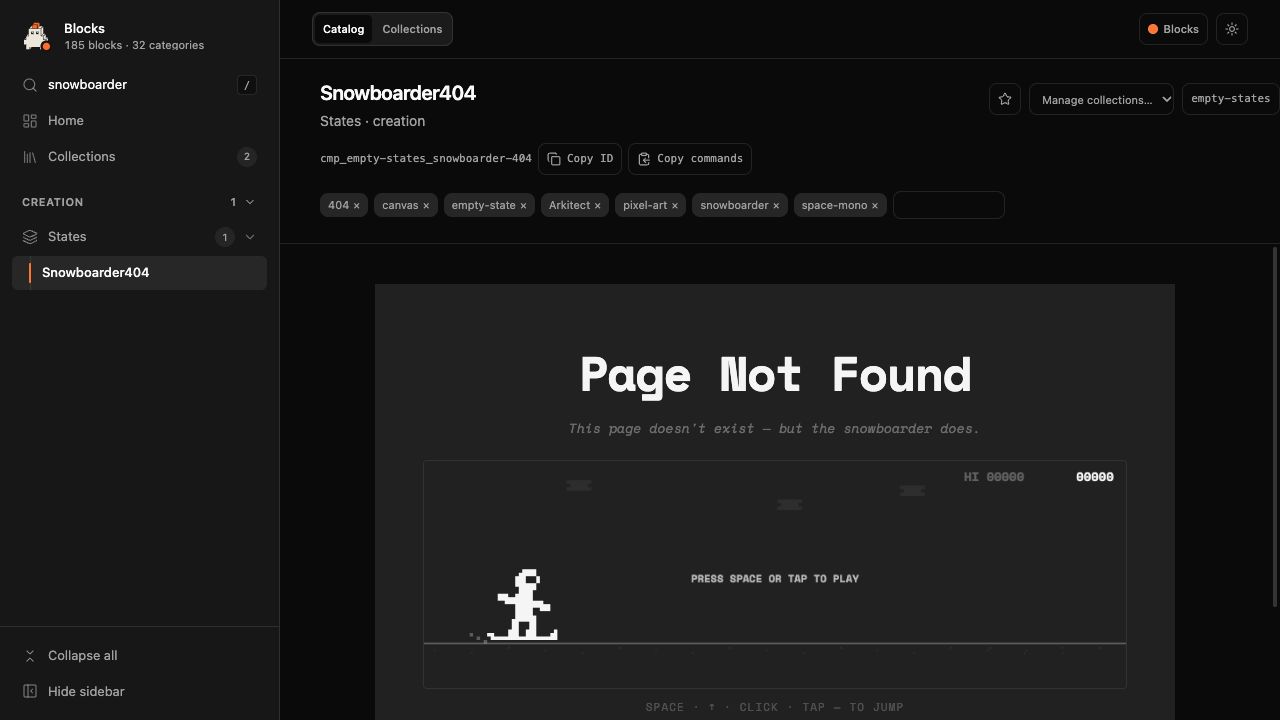
Blockbase keeps the imported source in a separate revision, so adapting a component for another app leaves that copy intact. With a 21st.dev paste, it also keeps the raw clipboard text and saves the demo alongside the component.
That demo often contains the props, sample data, or surrounding layout that shows how the component is supposed to work. Keeping it with the source gives you a useful place to start when you come back to it.
Imports also record dependencies and any supplied source attribution. A paste that references a missing file gets a warning. Getting something into the catalog is only the first check; opening its preview and trying the interaction is part of the capture workflow.
Getting it into another app
The fiddly part is making the component fit. Import paths, colors, spacing, and dependencies all depend on the project it's going into.
Blockbase inspects that project and prepares a plan showing the files and styling changes. One of the adaptation tests takes a card styled with bg-card and maps its background to the destination's --color-surface variable. Spacing, radius, and shadow values without a matching token remain marked for review.
That's the behavior I want: show me what maps cleanly and what still needs work. The agent integration asks for approval before writing the adapted files.
The plan includes proposed files, import changes, and dependency requirements. Adding a component writes the planned files; dependencies are proposed separately. The agent then runs the validation commands listed in the adaptation's manifest, which records what was added and how to check it.
Get it running
You'll need Node.js 24 or newer. The current installation paths support macOS and Linux; Windows hasn't been verified.
Codex or Cursor
Open a terminal in the project where you want to use Blockbase. Install the CLI, then add the agent skills to that project:
npm install -g @blockbase/cli
blockbase agent install --provider codex --scope project --project .
For Cursor, replace codex with cursor in the second command. Start a new agent session in the project after installation.
The installer creates your catalog if it's missing and sets up a user login service to run the catalog page in the background. Open your local catalog to browse it. A new catalog starts empty; the components in my screenshot are ones I've saved.
You can check the environment and whether the catalog server is running with:
blockbase doctor
blockbase ui status
If you prefer to run the catalog manually, add --no-setup to the agent install command, then run blockbase setup --no-service followed by blockbase ui. The installation docs cover the service controls and other setup options.
Claude Code
You can install the plugin directly inside Claude Code:
/plugin marketplace add taylorsegell/blockbase
/plugin install blockbase@blockbase
The plugin installs the CLI into its own data directory on the next session. Node.js 24+ and npm still need to be installed. Your first Blockbase request offers to run setup, which creates the catalog and starts the same local catalog service.
Save something, then use it
Start with a component you know. Point your agent at its file or folder and ask:
Save this component and its demo in Blockbase.
Open its preview in the browser.
Check how it looks and try the interaction.
For a 21st.dev component, paste the copied code into the agent and ask it to save it in Blockbase. The capture skill handles splitting the paste into component and demo files. Check any reported missing imports or styling issues before treating it as ready to reuse.
In another project, install the agent integration there too. Your catalog is already on the machine, so the saved component is available from that project. Ask for it by name:
Find [component name] in my Blockbase catalog.
Show how it would fit this project.
Include any changes or manual work needed.
Wait for my approval before adding it.
Review the plan, approve the changes you want, and have the agent run the checks. Then open the destination app. A passing code check and a component that looks right are both worth having.
Where it stands
Blockbase is still React-focused. Dynamic styling, missing imports, and unfamiliar project conventions can need manual work. The snowboarder being in the catalog doesn't mean it will drop into every app untouched. I still need to run it in the destination and check it.
The project is available on GitHub under the MIT license. Components you import retain their own licenses.
Start with something you'd actually want to use again. A snowboarder is optional.
Questions about this work — or a similar problem?